
Writing a C++ Program

Properly written C++ programs have a particular structure. The syntax must be correct, or the compilerwill generate error messages and not produce executable machine language. This chapter introduces C++by providing some simple example programs and associated fundamental concepts. Most of the concepts presented in this chapter are valid in many other programming languages as well. While other languages may implement the concepts using slightly different syntax, the ideas are directly transferable to other
languages like C, Java, C#, and Ada.
General Structure of a Simple C++ Program 
Listing 2.1 (simple.cpp) is one of the simplest C++ programs that does something:
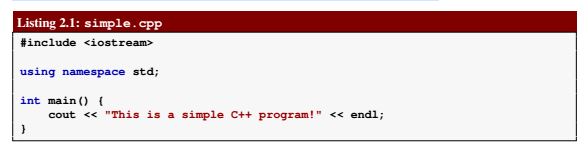
 You can type the text as shown in Listing 2.1 (simple.cpp) into an editor and save it to a file named
simple.cpp. The actual name of the file is irrelevant, but the name “simple” accurately describes the nature
of this program. The extension .cpp is a common extension used for C++ source code. After creating this file with a text editor and compiling it, you can run the program. The program prints the message

 • #include <iostream>
This line is a preprocessing directive. All preprocessing directives within C++ source code begin with
a # symbol. This one directs the preprocessor to add some predefined source code to our existing
source code before the compiler begins to process it. This process is done automatically and is invisible to us.Here we want to use some parts of the iostream library, a collection precompiled C++ code that C++
programs (like ours) can use. The iostream library contains routines that handle input and output (I/O) that include functions such as printing to the display, getting user input from the keyboard, and dealing with files.
Two items used in Listing 2.1 (simple.cpp), cout and endl, are not part of the C++ language itself.
These items, along with many other things related to input and output, were developed in C++, com-
piled, and stored in the iostream library. The compiler needs to be aware of these iostream items so it can compile our program. The #include directive specifies a file, called a header, that contains the specifications for the library code. The compiler checks how we use cout and endl within our code against the specifications in the <iostream> header to ensure that we are using the library code correctly. Most of the programs we write use this #include <iostream> directive, and some programs we will write in the future will #include other headers as well.

• using namespace std;
The two items our program needs to display a message on the screen, cout and endl, have longer 
names: std::cout and std::endl. This using namespace std directive allows us to
omit the std:: prefix and use their shorter names. This directive is optional, but if we omit it, we
must use the longer names. Listing 2.2 (simple2.cpp) shows how the longer names are used. The
name std stands for “standard,” and the using namespace std line indicates that some of the
names we use in our program are part of the so-called “standard namespace.”
• int main() {
This specifies the real beginning of our program. Here we are declaring a function named main. All
C++ programs must contain this function to be executable. Details about the meaning of int and
the parentheses will appear in later chapters. More general information about functions appear in
Chapter 8 and Chapter 9.
The opening curly brace at the end of the line marks the beginning of the body of a function. The
body of a function contains the statements the function is to execute.
• cout << "This is a simple C++ program!"<< endl;
The body of our main function contains only one statement. This statement directs the executing
program to print the message This is a simple C++ program! on the screen. A statement is the
fundamental unit of execution in a C++ program. Functions contain statements that the compiler
translates into executable machine language instructions. C++ has a variety of different kinds ofstatements, and the chapters that follow explore these various kinds of statements. All statements in
C++ end with a semicolon (;). A more detailed explanation of this statement appears below.
• }
The closing curly brace marks the end of the body of a function. Both the open curly brace and closecurly brace are required for every function definition.
Share:

Exercises

1. What is a compiler?
2. How is compiled code different from source code?
3. What tool does a programmer use to produce C++ source code?
4. What tool(s) does a programmer use to convert C++ source code into executable machine code?
5. What does the linker do?
6. Does the linker deal with files containing source code or or machine language code?
7. What does the preprocessor do to source code?
8. List several advantages developing software in a higher-level language has over developing software
   in machine language.
9. How can an IDE improve a programmer’s productivity?
10. Name a popular C++ IDE is used by programmers developing for Microsoft Windows.
11. Name a popular C++ IDE is used by programmers developing for Apple Mac OS X.

 Source: freecomputerbooks.com     

More information:

SUBSCRIBE my channel: https://goo.gl/1zLeJW

Circle us on G+ : https://goo.gl/dIuhsO  
Follow us Facebook: http://goo.gl/00Ega4

Follow us on Twitter: https://goo.gl/V1906U

blog: http://goo.gl/wYKu5G

makemoneyonlinebanglatutorial:http://goo.gl/4ZpivU
freecomputercourseonline:   http://goo.gl/lTykDp
Share:

Summary

This book does not attempt to cover all the facets of the C++ programming language. Experienced
programmers should look elsewhere for books that cover C++ in much more detail. The focus here is on
introducing programming techniques and developing good habits. To that end, our approach avoids some of
the more esoteric features of C++ and concentrates on the programming basics that transfer directly to other
imperative programming languages such as Java, C#, and Python. We stick with the basics and explore
more advanced features of C++ only when necessary to handle the problem at hand.


• Computers require both hardware and software to operate. Software consists of instructions that
control the hardware.
• At the lowest level, the instructions for a computer program can be represented as a sequence of zeros
and ones. The pattern of zeros and ones determine the instructions performed by the processor.
• Two different kinds of processors can have different machine languages.
• Application software can be written largely without regard to the underlying hardware. A tool called
a compiler translates the higher-level, abstract language into the machine language required by the
hardware.
• Programmers develop software using tools such as editors, compilers, debuggers, and profilers.
• C++ is a higher-level programming language.
• An IDE is an integrated development environment—one program that provides all the tools that
developers need to write software.

 Source: freecomputerbooks.com     

More information:

SUBSCRIBE my channel: https://goo.gl/1zLeJW

Circle us on G+ : https://goo.gl/dIuhsO  
Follow us Facebook: http://goo.gl/00Ega4

Follow us on Twitter: https://goo.gl/V1906U

blog: http://goo.gl/wYKu5G

makemoneyonlinebanglatutorial:http://goo.gl/4ZpivU
freecomputercourseonline:   http://goo.gl/lTykDp
Share:

LEARNING PROGRAMMING WITH C++

We generally do not think about the preprocessor, compiler, and linker working as three separate
programs (although they do); the tools we use make it appear as only one process is taking place:
translating our source code to an executable program.
• Debuggers. A debugger allows a programmer to more easily trace a program’s execution in order
to locate and correct errors in the program’s implementation. With a debugger, a developer can
simultaneously run a program and see which line in the source code is responsible for the program’s
current actions. The programmer can watch the values of variables and other program elements to see
if their values change as expected. Debuggers are valuable for locating errors (also called bugs) and
repairing programs that contain errors. (See Section 4.6 for more information about programming
errors.)
• Profilers. A profiler collects statistics about a program’s execution allowing developers to tune ap-
propriate parts of the program to improve its overall performance. A profiler indicates how many
times a portion of a program is executed during a particular run, and how long that portion takes to
execute. Profilers also can be used for testing purposes to ensure all the code in a program is actually
being used somewhere during testing. This is known as coverage. It is common for software to fail
after its release because users exercise some part of the program that was not executed anytime during
testing. The main purpose of profiling is to find the parts of a program that can be improved to make
the program run faster.
The programming components of the development process are illustrated in Figure 1.1.
Many developers use integrated development environments (IDEs). An IDE includes editors, debug-
gers, and other programming aids in one comprehensive program. Examples of IDEs for C++ include
Microsoft’s Visual Studio 2013, the Eclipse Foundation’s Eclipse CDT, and Apple’s XCode.
Despite the plethora of tools (and tool vendors’ claims), the programming process for all but trivial
programs is not automatic. Good tools are valuable and certainly increase the productivity of developers,
but they cannot write software. There are no substitutes for sound logical thinking, creativity, common
sense, and, of course, programming experience.
Share:

DEVELOPMENT TOOLS

• Compilers. A compiler translates the source code to target code. The target code may be the machine
language for a particular platform or embedded device. The target code could be another source
language; for example, the earliest C++ compiler translated C++ into C, another higher-level language.
The resulting C code was then processed by a C compiler to produce an executable program. C++
compilers today translate C++ directly into machine language.
The complete set of build tools for C++ includes a preprocessor, compiler, and linker:
– Preprocessor—adds to or modifies the contents of the source file before the compiler begins
processing the code. We use the services of the preprocessor mainly to #include information
about library routines our programs use.
– Compiler—translates C++ source code to machine code.
– Linker—combines the compiler-generated machine code with precompiled library code or
compiled code from other sources to make a complete executable program. Most compiled
C++ code is incapable of running by itself and needs some additional machine code to make a

complete executable program. The missing machine code has been precompiled and stored in
a repository of code called a library. A program called a linker combines the programmer’s
compiled code and the library code to make a complete program.

 Source: freecomputerbooks.com     

More information:

SUBSCRIBE my channel: https://goo.gl/1zLeJW

Circle us on G+ : https://goo.gl/dIuhsO  
Follow us Facebook: http://goo.gl/00Ega4

Follow us on Twitter: https://goo.gl/V1906U

blog: http://goo.gl/wYKu5G

makemoneyonlinebanglatutorial:http://goo.gl/4ZpivU
freecomputercourseonline:   http://goo.gl/lTykDp
Share:

DEVELOPMENT TOOLS

processing is still an active area of artificial intelligence research. Natural languages, as they are used
by most humans, are inherently ambiguous. To understand properly all but a very limited subset of a
natural language, a human (or artificially intelligent computer system) requires a vast amount of background
knowledge that is beyond the capabilities of today’s software. Fortunately, programming languages provide
a relatively simple structure with very strict rules for forming statements that can express a solution to any
problem that can be solved by a computer.
Consider the following program fragment written in the C++ programming language:
subtotal = 25;
tax = 3;
total = subtotal + tax;
These three lines do not make up a complete C++ program; they are merely a piece of a program. The
statements in this program fragment look similar to expressions in algebra. We see no sequence of bi-
nary digits. Three words, subtotal, tax, and total, called variables, are used to hold information.
Mathematicians have used variables for hundreds of years before the first digital computer was built. In
programming, a variable represents a value stored in the computer’s memory. Familiar operators (= and +)
are used instead of some cryptic binary digit sequence that instructs the processor to perform the operation.
Since this program is expressed in the C++ language, not machine language, it cannot be executed directly
on any processor. A C++ compiler is used to translate the C++ code into machine code.
The higher-level language code is called source code. The compiled machine language code is called
the target code. The compiler translates the source code into the target machine language.
The beauty of higher-level languages is this: the same C++ source code can be compiled to different
target platforms. The target platform must have a C++ compiler available. Minor changes in the source code
may be required because of architectural differences in the platforms, but the work to move the program
from one platform to another is far less than would be necessary if the program for the new platform had
to be rewritten by hand in the new machine language. Just as importantly, when writing the program the
human programmer is free to think about writing the solution to the problem in C++, not in a specific
machine language.
Programmers have a variety of tools available to enhance the software development process. Some
common tools include:
• Editors. An editor allows the user to enter the program source code and save it to files. Most pro-
gramming editors increase programmer productivity by using colors to highlight language features.
The syntax of a language refers to the way pieces of the language are arranged to make well-formed
sentences. To illustrate, the sentence
The tall boy runs quickly to the door.
uses proper English syntax. By comparison, the sentence
Boy the tall runs door to quickly the.
is not correct syntactically. It uses the same words as the original sentence, but their arrangement
does not follow the rules of English.
Similarly, programmers must follow strict syntax rules to create well-formed computer programs.
Only well-formed programs are acceptable and can be compiled and executed. Some syntax-aware
editors can use colors or other special annotations to alert programmers of syntax errors before the
program is compiled.

 Source: freecomputerbooks.com     

More information:

SUBSCRIBE my channel: https://goo.gl/1zLeJW

Circle us on G+ : https://goo.gl/dIuhsO  
Follow us Facebook: http://goo.gl/00Ega4

Follow us on Twitter: https://goo.gl/V1906U

blog: http://goo.gl/wYKu5G

makemoneyonlinebanglatutorial:http://goo.gl/4ZpivU
freecomputercourseonline:   http://goo.gl/lTykDp
Share:

Development Tools

If very few humans can (or want) to speak the machine language of the computers’ processors and software
is expressed in this language, how has so much software been developed over the years?
Software can be represented by printed words and symbols that are easier for humans to manage than
binary sequences. Tools exist that automatically convert a higher-level description of what is to be done
into the required lower-level code. Higher-level programming languages like C++ allow programmers to
express solutions to programming problems in terms that are much closer to a natural language like English.
Some examples of the more popular of the hundreds of higher-level programming languages that have been
devised over the past 60 years include FORTRAN, COBOL, Lisp, Haskell, C, Perl, Python, Java, and C#.
Most programmers today, especially those concerned with high-level applications, usually do not worry
about the details of underlying hardware platform and its machine language.
One might think that ideally such a conversion tool would accept a description in a natural language,
such as English, and produce the desired executable code. This is not possible today because natural
languages are quite complex compared to computer programming languages. Programs called compilers
that translate one computer language into another have been around for over 60 years, but natural language

 Source: freecomputerbooks.com     

More information:

SUBSCRIBE my channel: https://goo.gl/1zLeJW

Circle us on G+ : https://goo.gl/dIuhsO  
Follow us Facebook: http://goo.gl/00Ega4

Follow us on Twitter: https://goo.gl/V1906U

blog: http://goo.gl/wYKu5G

makemoneyonlinebanglatutorial:http://goo.gl/4ZpivU
freecomputercourseonline:   http://goo.gl/lTykDp
Share:

Software

A computer program is an example of computer software. Software makes a computer a truly universal
machine transforming it into the proper tool for the task at hand. One can refer to a program as a piece of
software as if it were a tangible object, but software is actually quite intangible. It is stored on a medium. A
hard drive, a CD, a DVD, and a USB pen drive are all examples of media upon which software can reside.
The CD is not the software; the software is a pattern on the CD. In order to be used, software must be stored
in the computer’s memory. Typically computer programs are loaded into memory from a medium like the
computer’s hard disk. An electromagnetic pattern representing the program is stored on the computer’s hard
drive. This pattern of electronic symbols must be transferred to the computer’s memory before the program
can be executed. The program may have been installed on the hard disk from a CD or from the Internet. In
any case, the essence that was transferred from medium to medium was a pattern of electronic symbols that
direct the work of the computer system.
These patterns of electronic symbols are best represented as a sequence of zeroes and ones, digits from
the binary (base 2) number system. An example of a binary program sequence is
10001011011000010001000001001110
To the underlying computer hardware, specifically the processor, a zero here and three ones there might
mean that certain electrical signals should be sent to the graphics device so that it makes a certain part of
the display screen red. Unfortunately, only a minuscule number of people in the world would be able to
produce, by hand, the complete sequence of zeroes and ones that represent the program Microsoft Word
for an Intel-based computer running the Windows 8 operating system. Further, almost none of those who
could produce the binary sequence would claim to enjoy the task.
The Word program for older Mac OS X computers using a PowerPC processor works similarly to the
Windows version and indeed is produced by the same company, but the program is expressed in a com-
pletely different sequence of zeroes and ones! The Intel Core i7 processor in the Windows machine accepts
a completely different binary language than the PowerPC processor in the Mac. We say the processors have
their own machine language.

 Source: freecomputerbooks.com     

More information:

SUBSCRIBE my channel: https://goo.gl/1zLeJW

Circle us on G+ : https://goo.gl/dIuhsO  
Follow us Facebook: http://goo.gl/00Ega4

Follow us on Twitter: https://goo.gl/V1906U

blog: http://goo.gl/wYKu5G

makemoneyonlinebanglatutorial:http://goo.gl/4ZpivU
freecomputercourseonline:   http://goo.gl/lTykDp
Share:

The Context of Software Development

A computer program, from one perspective, is a sequence of instructions that dictate the flow of electri-cal impulses within a computer system. These impulses affect the computer’s memory and interact withthe display screen, keyboard, mouse, and perhaps even other computers across a network in such a wayas to produce the “magic” that permits humans to perform useful tasks, solve high-level problems, andplay games. One program allows a computer to assume the role of a financial calculator, while anothertransforms the machine into a worthy chess opponent. Note the two extremes here:• at the lower, more concrete level electrical impulses alter the internal state of the computer, while• at the higher, more abstract level computer users accomplish real-world work or derive actual plea-sure.So well is the higher-level illusion achieved that most computer users are oblivious to the lower-levelactivity (the machinery under the hood, so to speak). Surprisingly, perhaps, most programmers today writesoftware at this higher, more abstract level also. An accomplished computer programmer can developsophisticated software with little or no interest or knowledge of the actual computer system upon which itruns. Powerful software construction tools hide the lower-level details from programmers, allowing themto solve problems in higher-level terms.The concepts of computer programming are logical and mathematical in nature. In theory, computerprograms can be developed without the use of a computer. Programmers can discuss the viability of aprogram and reason about its correctness and efficiency by examining abstract symbols that correspondto the features of real-world programming languages but appear in no real-world programming language.While such exercises can be very valuable, in practice computer programmers are not isolated from theirmachines. Software is written to be used on real computer systems. Computing professionals knownas software engineers develop software to drive particular systems. These systems are defined by theirunderlying hardware and operating system. Developers use concrete tools like compilers, debuggers, andprofilers. This chapter examines the context of software development, including computer systems andtools. 
Source: freecomputerbooks.com     

More information:

SUBSCRIBE my channel: https://goo.gl/1zLeJW

Circle us on G+ : https://goo.gl/dIuhsO  
Follow us Facebook: http://goo.gl/00Ega4

Follow us on Twitter: https://goo.gl/V1906U

blog: http://goo.gl/wYKu5G

makemoneyonlinebanglatutorial:http://goo.gl/4ZpivU
freecomputercourseonline:   http://goo.gl/lTykDp
Share:

Share:

Pages

Theme Support